Table of Contents
To improve Core Web Vitals, fix LCP first by optimizing images, reducing server response times, and removing render-blocking CSS and JavaScript. Next, improve CLS by setting image dimensions, reserving space for ads and embeds, and preventing layout shifts. Finally, optimize INP by reducing unnecessary JavaScript, breaking up long tasks, and minimizing third-party scripts. Prioritizing fixes in this order delivers the biggest performance improvements and helps websites pass Core Web Vitals faster.
Most Core Web Vitals issues are not caused by a single problem. They usually result from slow loading elements, layout instability, and excessive JavaScript competing for browser resources.
The most effective way to improve Core Web Vitals is to prioritize fixes based on impact. For most websites, that means improving Largest Contentful Paint (LCP) first, reducing Cumulative Layout Shift (CLS) second, and optimizing Interaction to Next Paint (INP) last.
Core Web Vitals Improvement Priorities At A Glance
| Metric | What It Measures | Target Score | Common Issues | Priority |
|---|---|---|---|---|
| LCP | Loading Performance | ≤ 2.5 Seconds | Slow hosting, large images, render-blocking resources, poor caching | Highest |
| CLS | Visual Stability | ≤ 0.1 | Images without dimensions, ads, embeds, font loading issues | Medium |
| INP | Responsiveness | ≤ 200ms | Heavy JavaScript, long tasks, large DOM size, third-party scripts | High |
This guide explains how Google measures Core Web Vitals in 2026, what commonly causes poor scores, and the framework that consistently delivers the fastest improvements across ecommerce, SaaS, local business, and content-driven websites.
What Are Core Web Vitals?
Core Web Vitals are a subset of Google's Page Experience signals and represent the metrics Google uses to measure loading speed, responsiveness, and visual stability based on real-user browsing data collected through the Chrome User Experience Report (CrUX).
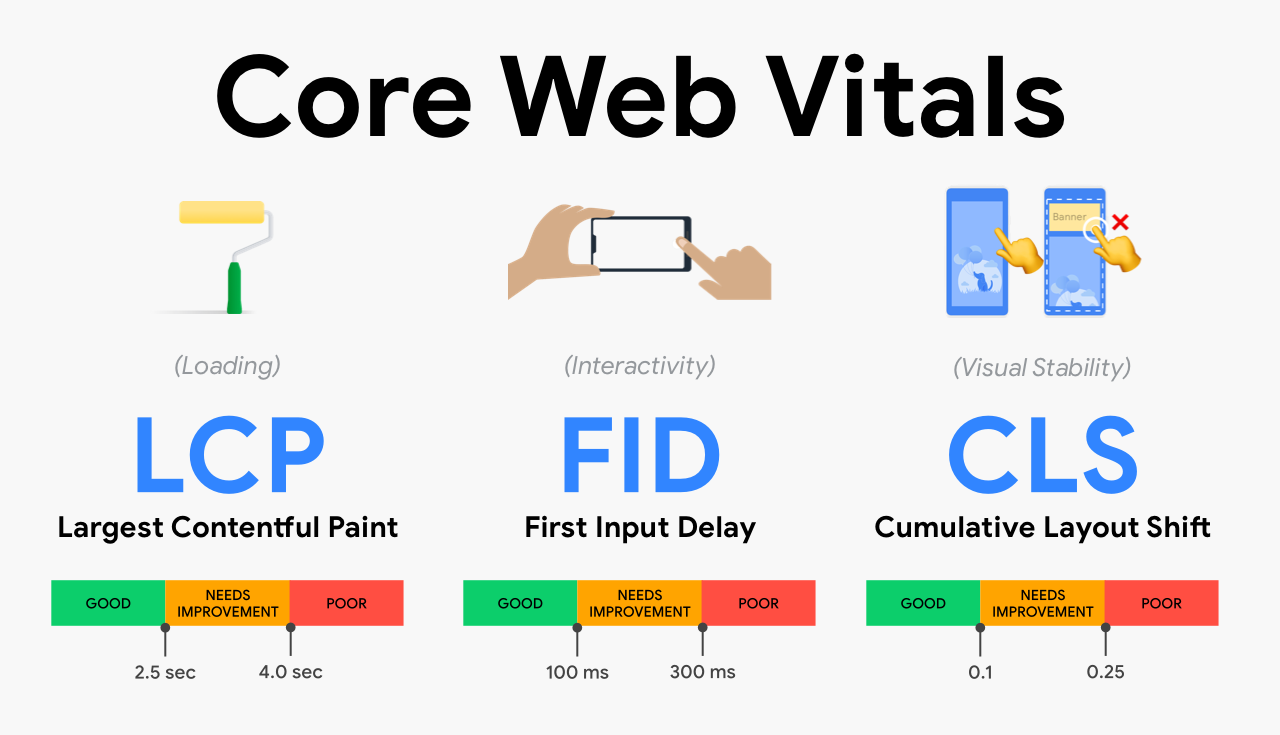
Unlike traditional speed metrics that focus only on loading times, Core Web Vitals evaluate three specific areas of page experience:
| Metric | Measures | Good Score |
|---|---|---|
| Largest Contentful Paint (LCP) | Loading Performance | ≤ 2.5 Seconds |
| Interaction to Next Paint (INP) | Responsiveness | ≤ 200ms |
| Cumulative Layout Shift (CLS) | Visual Stability | ≤ 0.1 |
Google's Core Web Vitals Thresholds
| Metric | Good | Needs Improvement | Poor |
|---|---|---|---|
| LCP | ≤ 2.5s | 2.5s – 4s | > 4s |
| INP | ≤ 200ms | 200ms – 500ms | > 500ms |
| CLS | ≤ 0.1 | 0.1 – 0.25 | > 0.25 |
Google uses real-world data collected through the Chrome User Experience Report (CrUX) to assess these metrics, making field data significantly more important than isolated lab tests. A website passes Core Web Vitals when at least 75% of real users experience all three metrics within Google's recommended thresholds.
Field Data vs Lab Data
One of the most common misconceptions about Core Web Vitals is assuming that Lighthouse scores alone determine performance. Google primarily evaluates Core Web Vitals using field data collected from real users through the Chrome User Experience Report (CrUX). Tools such as Lighthouse and PageSpeed Insights also provide lab data, which helps diagnose performance issues but does not directly determine whether a page passes Core Web Vitals assessments.
Why Core Web Vitals Still Matter In 2026
Google has repeatedly stated that content relevance remains a stronger ranking factor than page experience. However, when multiple pages provide similar value, user experience signals often influence which page performs better.
More importantly, Core Web Vitals directly impact business performance: higher bounce rates, lower engagement, reduced conversions, poor mobile usability, lower lead generation, and increased abandonment rates.
A visitor may never know what Largest Contentful Paint or Interaction to Next Paint means, but they immediately notice when a website loads slowly, feels unresponsive, or shifts unexpectedly while they're trying to use it.
The Core Web Vitals Prioritization Framework
Many websites attempt to fix all Core Web Vitals simultaneously. In practice, the most effective optimization strategy follows this order: Largest Contentful Paint (LCP) first, Cumulative Layout Shift (CLS) second, and Interaction To Next Paint (INP) last. This framework focuses on resolving the highest-impact bottlenecks first before moving to smaller optimization opportunities.
Priority #1: Improve Largest Contentful Paint (LCP)
Largest Contentful Paint measures how long it takes for the largest visible element on a page to appear. In most cases, this element is a hero image, featured image, product image, banner section, or main heading. Because LCP affects the user's first impression of a page, it typically delivers the largest performance gains when optimized correctly.
Common Causes Of Poor LCP Scores
Slow server response times are a primary cause — before any content appears, the browser must receive data from the server. Common causes include shared hosting, poor caching configurations, slow databases, excessive plugins, and inefficient backend processing. Render-blocking CSS and JavaScript also frequently delay page rendering, especially when third-party scripts compete for resources. Unoptimized, oversized hero images remain one of the most common causes of slow LCP scores.
How To Improve LCP
Time To First Byte (TTFB), Content Delivery Networks (CDNs), HTTP/3 support, Critical CSS delivery, and Render-Blocking Resources all play a significant role in loading performance. Addressing these areas often produces larger improvements than isolated front-end optimizations.
- Optimize hosting infrastructure and implement page caching
- Use a CDN and reduce TTFB
- Preload critical resources and eliminate render-blocking resources
- Deliver Critical CSS efficiently and enable HTTP/3 where possible
- Compress images and use AVIF or WebP formats with responsive sizing
- Apply Lazy Loading to below-the-fold assets
- Remove unnecessary third-party scripts
<link rel="preload" as="image" href="/hero.webp" fetchpriority="high">On mobile specifically, check what the LCP element actually is before optimizing images — I regularly find sites spending hours compressing a hero photo when the real LCP element was a headline blocked behind a slow font request.
Priority #2: Improve Cumulative Layout Shift (CLS)
Cumulative Layout Shift measures unexpected movement of page elements while content loads. Few issues frustrate users more than attempting to click a button only to have it move moments before interaction.
Common Causes Of CLS
Images without dimensions, advertisement containers, embedded videos and maps, third-party widgets, web font loading issues, and dynamic content injection are the most frequent culprits.
How To Improve CLS
- Always define image
widthandheightattributes - Reserve space for advertisements and embedded content
- Use CSS
aspect-ratiowhere appropriate - Optimize font loading with
font-display: swap - Avoid injecting content above existing elements
Many CLS issues can be identified quickly through Chrome DevTools and are often easier to fix than loading or responsiveness problems.

Priority #3: Improve Interaction To Next Paint (INP)
Interaction to Next Paint measures how quickly a page responds when users interact with it. Google replaced First Input Delay (FID) with INP because modern websites often struggle with responsiveness after an interaction begins, not just before it starts.
Common Causes Of Poor INP Scores
Long JavaScript tasks, large DOM structures, heavy event handlers, third-party scripts, client-side rendering delays, and excessive JavaScript execution are the primary causes.
How To Improve INP
- Remove unused JavaScript and break up long tasks
- Reduce DOM complexity and delay non-critical scripts
- Optimize event handlers and reduce third-party dependencies
- Improve main-thread availability
For many modern websites, especially those using JavaScript-heavy frameworks, INP optimization often requires deeper development work than LCP or CLS improvements.
Not sure which of these applies to your site?
I run a full Core Web Vitals + technical SEO audit and hand you a prioritized fix list — free, no strings attached.
Essential Tools For Core Web Vitals Optimization
Google Search Console provides real-user Core Web Vitals data and identifies affected page groups across your website. PageSpeed Insights combines Lighthouse diagnostics with Chrome UX Report data, making it useful for both troubleshooting and validation. Lighthouse helps identify render-blocking resources, unused JavaScript, image optimization opportunities, and performance bottlenecks. Chrome DevTools provides advanced debugging for layout shifts, rendering performance, JavaScript execution, and network activity. Chrome UX Report (CrUX) offers real-user performance data and serves as the primary source behind Google's Core Web Vitals reporting. WebPageTest is useful for advanced performance testing, waterfall analysis, and identifying rendering bottlenecks.
Common Core Web Vitals Mistakes
Many websites fail to improve Core Web Vitals because they focus on low-impact fixes while ignoring larger bottlenecks. Common mistakes include optimizing only desktop performance, ignoring mobile users, chasing Lighthouse scores instead of field data, testing only the homepage, installing multiple optimization plugins, compressing images without fixing server issues, overloading pages with third-party scripts, and ignoring template-level performance problems.
A Practical Core Web Vitals Audit Process
A structured audit process helps identify the changes that will have the greatest impact.
- Review Core Web Vitals data in Google Search Console.
- Identify affected page templates.
- Determine whether LCP, CLS, or INP is causing the biggest issue.
- Optimize Largest Contentful Paint first.
- Resolve layout stability issues.
- Improve responsiveness and JavaScript efficiency.
- Monitor field data after deployment.
- Validate improvements using PageSpeed Insights and CrUX.
Core Web Vitals Trends For 2026
While the fundamentals of Core Web Vitals remain consistent, several trends continue shaping website performance strategies in 2026. INP remains the primary responsiveness metric following the retirement of FID. AVIF adoption continues to increase due to superior image compression. Edge caching and CDN optimization play a larger role in global website performance. JavaScript efficiency remains one of the biggest challenges for modern websites. Field data continues to carry more weight than synthetic performance testing.
Key Takeaways
- LCP usually provides the biggest opportunity for improvement.
- Server performance, image optimization, and render-blocking resources heavily influence loading speed.
- CLS issues are commonly caused by images, ads, embeds, and font loading.
- INP primarily depends on JavaScript efficiency and main-thread availability.
- Google evaluates Core Web Vitals using real-user data — field performance matters more than Lighthouse scores alone.
- A prioritized optimization strategy delivers faster and more meaningful improvements.
As part of a broader Technical SEO and Website Performance Optimization strategy, Core Web Vitals should be monitored continuously rather than treated as a one-time project. Ongoing improvements to infrastructure, content delivery, and front-end performance help maintain strong Page Experience signals over time.
Frequently Asked Questions

Mohammad Owais
Senior SEO Specialist with 8+ years of experience in Technical SEO, AI Search Optimization and Digital PR. More about Mohammad →